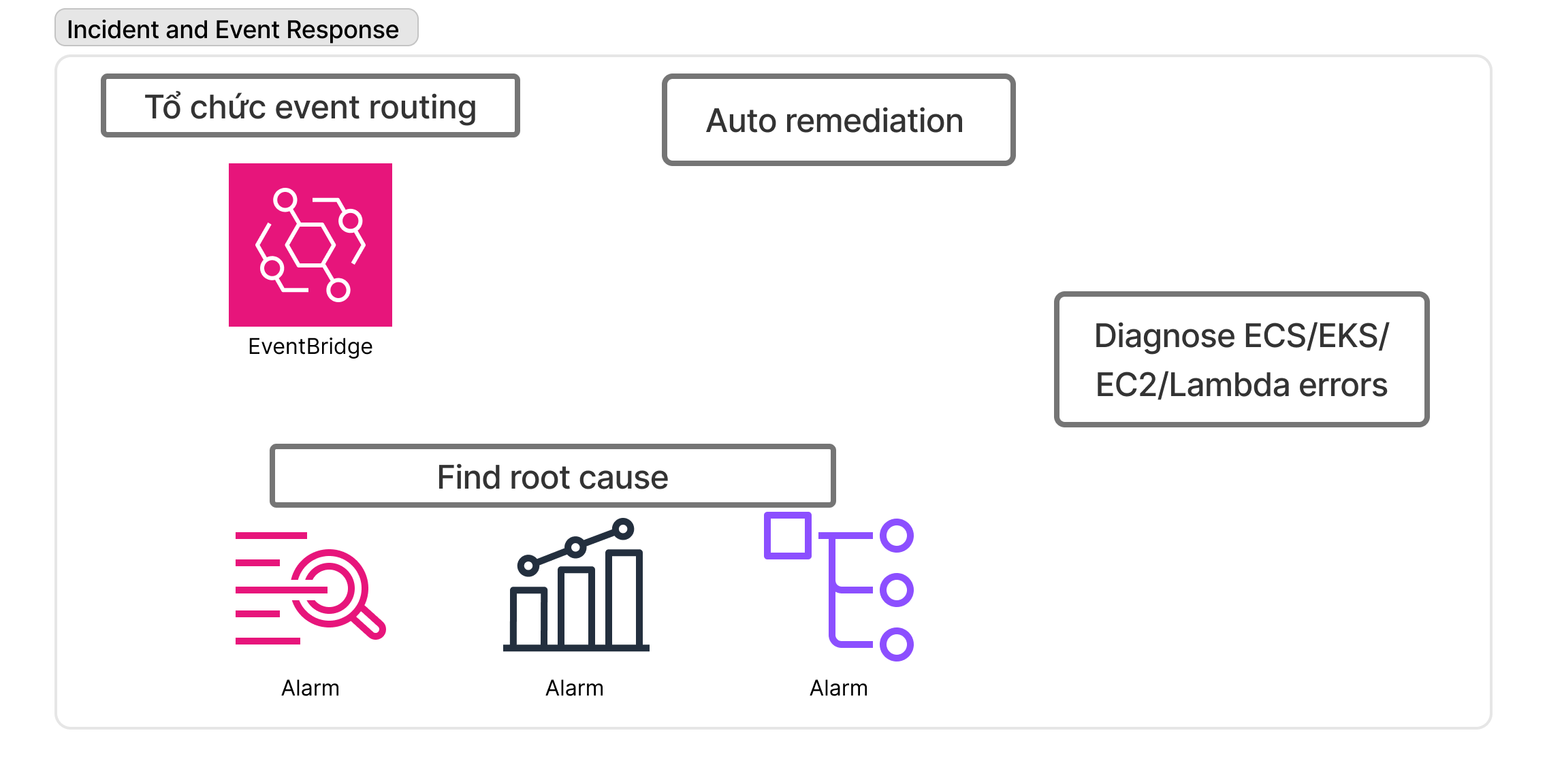
Incident and Event Response
Chào anh em, lại là Horashi đây! 🚀
Nếu anh em đang theo đuổi con đường DevOps trên hệ sinh thái AWS, chắc hẳn đã nghe đến “con trùm cuối” mang tên AWS Certified DevOps Engineer - Professional (DOP-C02). Đây được mệnh danh là một trong những chứng chỉ “khoai” nhất, nhưng cũng danh giá bậc nhất của AWS.
Nó không chỉ đòi hỏi bạn phải thuộc lòng các dịch vụ, mà còn phải biết cách kết hợp chúng lại để giải quyết các bài toán vận hành, bảo mật và triển khai liên tục ở quy mô doanh nghiệp.
Trong bài viết này, chúng ta sẽ cùng mổ xẻ chứng chỉ DOP và vạch ra một lộ trình (roadmap) rõ ràng để anh em có thể tự tin bước vào phòng thi nhé!
🏆 Tại sao lại là AWS DevOps Professional (DOP)?
- Minh chứng năng lực thực thụ: Ở level Professional, bạn không thể thi đỗ nếu chỉ học vẹt. Bài thi yêu cầu kinh nghiệm thực chiến sâu sắc về CI/CD, IaC, High Availability và Security.
- Giá trị trên thị trường: Chứng chỉ này giúp CV của bạn lọt vào mắt xanh của các nhà tuyển dụng cho các vị trí Senior DevOps, Cloud Architect, hoặc SRE với mức đãi ngộ cực kỳ hấp dẫn.
- Tư duy hệ thống: Quá trình ôn thi sẽ định hình lại cách bạn thiết kế hệ thống: Mọi thứ đều phải được tự động hóa, giám sát chặt chẽ và có khả năng tự phục hồi.
🗺️ Lộ Trình Chinh Phục DOP-C02 (Horashi’s Roadmap)
Để ăn trọn điểm bài thi này, bạn không thể nhảy vào học ngay kiến thức Professional. Hãy đi theo 4 giai đoạn sau:
Domain 1: SDLC Automation
-
Task 1: Implement CI/CD pipelines
- Hiểu rõ vòng đời của phát triển phần mềm (SDLC):
plan → code → build → test → release → deploy → operate → monitor. - Thiết kế
CI/CD pipelinechuẩn hóa cho nhiều môi trường (dev/test/staging/prod). - Tách biệt account theo best practice (
multi-account strategy). - Quản lý môi trường bằng
branch model(main branch, feature branch, release branch). - Kiểm soát version source code, enforce code review và PR workflow.
- Quản lý secrets và thông tin nhạy cảm bằng secret store (không hardcode).
- Lựa chọn deployment strategy phù hợp theo loại workload (EC2, ECS, Lambda…).
- Tự động rollback khi deploy thất bại.
- Logging pipeline để audit ai đã deploy và deploy cái gì.
- Service quan trọng:
CodeCommit, CodeBuild, CodePipeline, CodeDeploy, ECR, Secrets Manager, Parameter Store, IAM, CloudTrail.
- Hiểu rõ vòng đời của phát triển phần mềm (SDLC):
-
Task 2: Integrate automated testing into CI/CD pipelines
- Nắm rõ vai trò của từng loại test: Unit test, Integration test, UI test / end-to-end test, security scanning.
- Thiết lập pipeline để chạy test tự động khi có Pull Request, khi merge PR hoặc khi build artifact.
- Thiết lập threshold để chặn deploy khi test fail hoặc chất lượng code thấp.
- Kết hợp performance test (load, stress, spike) trước khi đưa lên production.
- Tự động hóa static code analysis, security analysis.
- Service quan trọng:
CodeBuild, CodePipeline, Step Functions, Lambda, CloudWatch Events, Inspector, CodeGuru Reviewer & Profiler.`
-
Task 3: Build and manage artifacts
- Hiểu khái niệm artifact: file build ra từ source (Jar, Docker image, zip, package…).
- Dùng artifact repository để quản lý, lưu trữ, version, trace build ID.
- Tách biệt build process khỏi deploy process (build once, deploy many).
- Promote artifacts qua nhiều environment không cần build lại.
- Tự động hóa build AMI chuẩn hóa cho EC2 (golden AMI) và container image cho ECS/EKS.
- Bảo vệ artifact bằng encryption và access control.
- Service quan trọng:
ECR, CodeArtifact, S3, CodeBuild, Lambda, EC2 Image Builder, KMS.
-
Task 4: Implement deployment strategies
- Deploy lên EC2 thông qua CodeDeploy (in-place hoặc blue/green).
- Deploy container lên ECS (Fargate/EC2).
- Deploy serverless (Lambda) bằng alias routing hoặc weighted traffic shifting.
- Cấu hình các
storage servicephù hợp với workload: EFS, S3, EBS. - Chọn đúng
deployment strategy: Rolling update, blue/green, canary. - Thiết lập
automation rollbackdựa vào health check & CloudWatch alarms.
Domain 2: Configuration Management and Infrastructure as Code
-
Task 1: Define infrastructure as code and reusable components
- Tạo hạ tầng bằng IaC để đảm bảo consistency, repeatability và version control.
- Sử dụng CloudFormation/CDK để tạo template, modules, nested stacks.
- Tách config bằng parameters, mapping, SSM Parameter Store để module tái sử dụng được.
- Sử dụng change sets để preview thay đổi trước khi deploy.
- Detect drift giữa template và environment thực tế và tự động remediation.
- Service quan trọng:
CloudFormation, CDK, SAM, AppConfig, SSM Parameter Store, Config Rules.
-
Task 2: Automate multi-account and multi-region deployments
- Áp dụng
best practices multi-account: security, networking, logging, sandbox, prod. - Dùng Organizations để quản lý accounts, SCP để enforce guardrails.
- Dùng StackSets để triển khai IaC trên toàn bộ account và region.
Cấu hình cross-account IAM roleđể CI/CD có thể deploy được.- Sử dụng Service Catalog để phân phối các template chuẩn hóa.
- Áp dụng
-
Task 3: Build scalable configuration management and automation
- Quản lý cấu hình hệ thống lớn bằng
SSM State Manager(enforce config liên tục). - Tự động chạy patch, update OS, apply security baseline qua
Patch Manager. - Run Command để tác động hàng loạt EC2 nhanh chóng.
- Automation Documents để
orchestrate workflownhiều bước.
- Quản lý cấu hình hệ thống lớn bằng
Domain 3: Resilient Cloud Solutions
-
Task 1 & 2: Highly available and scalable architectures
- Thiết kế
multi-AZ cho database, compute, routing. Multi-region cho hệ thống mission-critical. - Tách
microservices bằng queue/pub-subđể tránh liên kết chặt. Auto healing: instance fail → auto replace.- Horizontal scaling cho compute và container. Dynamic scaling dựa vào metrics (CPU, memory, SQS depth).
- Service quan trọng:
ALB, NLB, Auto Scaling, SQS, SNS, EventBridge, RDS Multi-AZ, DynamoDB.
- Thiết kế
-
Task 3: Implement disaster recovery strategies
- So sánh các DR strategies: Backup & Restore, Pilot Light, Warm Standby, Multi-Region Active-Active.
- Tự động replicate data cross-region. Test DR thường xuyên bằng automation.
Domain 4: Monitoring and Logging
Thu thập logtừ app, container, hệ điều hành và AWS services.- Centralized logging cho multi-account.
- Dùng
Logs Insightsđể truy vấn log và tìm nguyên nhân lỗi. - Dùng
X-Rayđểtrace distributed systems. - Tạo
CloudWatch Alarmscho CPU, memory, error rate. Event-drivenremediation: tự động restart service, scale out, sửa config.
Domain 5: Incident and Event Response
- Dùng
EventBridge để tổ chức event routing. Event filtering, schema registry để xử lý đúng loại event. Auto remediationkhi phát hiện security drift.- Dùng
log, metrics, traceđể tìm nguyên nhân gốc (root cause).Diagnose lỗi ECS/EKS/EC2/Lambda.
Domain 6: Security and Compliance
- Áp dụng principle of least privilege. Dùng IAM Role thay vì IAM User.
- Permission boundaries để giới hạn quyền của developers/team.
- Cross-account access bằng STS assume role.
- Organizations SCP để enforce guardrails giữa các account.
- Defense-in-depth:
KMS (at rest), ACM TLS (in transit), WAF (web apps), Shield (DDoS), Macie (PII), GuardDuty (threat detection).
💡 Bí kíp thực chiến từ Horashi
graph LR
    %% 1. Định nghĩa bảng màu (thêm cursor:pointer để chuột biến thành hình bàn tay khi di chuột vào)
    classDef main fill:#fde047,stroke:#111827,stroke-width:2px,color:#111827,rx:8px,ry:8px,font-weight:bold,cursor:pointer;
    classDef domain fill:#fef08a,stroke:#111827,stroke-width:2px,color:#111827,font-weight:bold,rx:5px,ry:5px,cursor:pointer;
    classDef tool fill:#ffffff,stroke:#3b82f6,stroke-width:2px,color:#111827,rx:5px,ry:5px,cursor:pointer;
    classDef subtool fill:#f8fafc,stroke:#94a3b8,stroke-width:1px,color:#475569,rx:5px,ry:5px,font-size:12px,cursor:pointer;

    %% 2. Khai báo các Node và mở rộng nhánh
    Root[🚀 Lộ trình DOP-C02]:::main

    %% --- DOMAIN 1: SDLC ---
    Root --- D1[Domain 1: SDLC Automation]:::domain
    D1 --- CICD(CI/CD Pipeline):::tool
    CICD --- C1[CodeCommit & CodeBuild]:::subtool
    CICD --- C2[CodeDeploy: Blue/Green, Canary]:::subtool
    D1 --- Artifact(Artifact Management):::tool
    Artifact --- A1[ECR & Image Builder]:::subtool

    %% --- DOMAIN 2: Config & IaC ---
    Root --- D2[Domain 2: Config & IaC]:::domain
    D2 --- IAC(Infrastructure as Code):::tool
    IAC --- I1[CloudFormation & Nested Stacks]:::subtool
    D2 --- Multi(Multi-account):::tool
    Multi --- M1[Organizations & StackSets]:::subtool
    D2 --- SSM(Systems Manager):::tool
    SSM --- S1[State Manager & Patch Manager]:::subtool

    %% --- DOMAIN 3: Resilient Solutions ---
    Root --- D3[Domain 3: Resilient Solutions]:::domain
    D3 --- HA(High Availability):::tool
    HA --- H1[ASG, ALB/NLB, RDS Multi-AZ]:::subtool
    D3 --- Decouple(Decoupling):::tool
    Decouple --- DC1[SQS, SNS, EventBridge]:::subtool
    D3 --- DR(Disaster Recovery):::tool
    DR --- DR1[Pilot Light, Warm Standby]:::subtool

    %% --- DOMAIN 4 & 5 & 6 (Giữ gọn gàng để sơ đồ không quá dài) ---
    Root --- D4[Domain 4: Monitoring]:::domain
    D4 --- Obs(CloudWatch, X-Ray, OpenSearch):::tool

    Root --- D5[Domain 5: Incident Response]:::domain
    D5 --- Event(Auto Remediation & EventBridge):::tool

    Root --- D6[Domain 6: Security]:::domain
    D6 --- ID(IAM, STS, SCPs):::tool
    D6 --- Protect(KMS, WAF, GuardDuty):::tool

    %% ==========================================
    %% 3. GẮN LINK CHO CÁC NODE BẰNG LỆNH CLICK
    %% Cú pháp: click Tên_Node "Đường_link_URL" "Ghi chú khi di chuột (Tooltip)"
    %% ==========================================

    %% Link về trang chủ hoặc Tag chính
    click Root "/" "Về trang chủ Horashi"
    click D1 "/tags/sdlc" "Xem tất cả bài về SDLC"
    click D2 "/tags/iac" "Xem tất cả bài về IaC"

    %% Link đến bài viết chi tiết (Bạn thay URL bằng slug bài viết thật của bạn)
    click C1 "/blog/aws-codebuild-codepipeline" "Đọc bài: Hướng dẫn CodeBuild"
    click C2 "/blog/chien-luoc-deploy-aws" "Đọc bài: Blue/Green & Canary Deploy"
    click I1 "/blog/cloudformation-co-ban" "Đọc bài: Làm chủ CloudFormation"
    click M1 "/blog/aws-organizations" "Đọc bài: Quản lý Multi-account"
    click S1 "/blog/ssm-state-manager" "Đọc bài: Quản lý cấu hình với SSM"
    click H1 "/blog/high-availability-aws" "Đọc bài: Thiết kế High Availability"
click ID "/blog/iam-best-practices" "Đọc bài: IAM Best Practices"- Hands-on, Hands-on và Hands-on! Đừng chỉ xem video. Hãy mở AWS Console lên, viết CloudFormation template, tạo một pipeline đẩy code từ GitHub lên ECS bằng CodePipeline. Lỗi ở đâu, fix ở đó. Càng gặp nhiều lỗi, bạn càng nhớ lâu.
- Đọc kĩ các Whitepapers: Đặc biệt là tài liệu “Practicing CI/CD on AWS” và “Introduction to DevOps on AWS”.
- Luyện đề (Practice Exams): Cấu trúc câu hỏi của DOP rất dài (nhiều câu chiếm cả một trang màn hình). Hãy luyện các bộ đề của Tutorials Dojo hoặc Stephane Maarek để quen với áp lực thời gian và cách đọc lướt tìm từ khóa (Keywords).
- Luôn nghĩ đến “Tự động hóa”: Trong 4 đáp án, đáp án nào yêu cầu con người can thiệp thủ công (manual) thường là đáp án SAI. AWS luôn ưu tiên giải pháp tự động 100%.
Chúc anh em học tốt và sớm “hái” được quả ngọt DOP-C02 nhé. Hẹn gặp lại ở các bài viết đào sâu vào từng dịch vụ tiếp theo trên Horashi Blog! 🚀